
Sound familiar? You want to answer a work email quickly, and next to it the newsletter from your favourite online shop is blinking. Or you’re on the sofa in the evening and the office inbox is giving you that look. 😬 That’s exactly what workspaces are for.
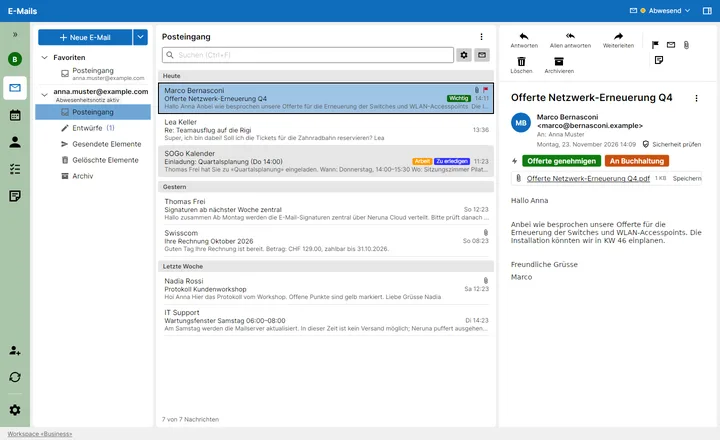
How it works
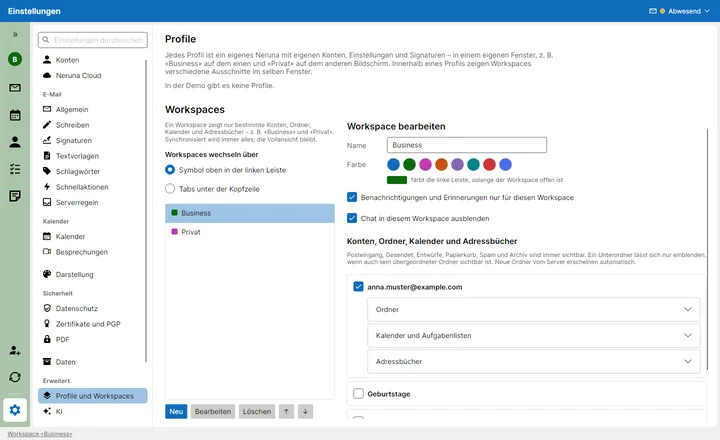
- Your own views: under Settings → Workspaces you create, say, “Business” and “Private” and choose which accounts, folders, calendars and address books belong to each.
- One click to switch: with the icon at the top of the left bar – or, if you prefer tabs, with tabs below the header.
- Every workspace has its colour: the left bar takes it on, so you always know where you are.
- Peace in the evening: if you like, new emails and reminders only come from the open workspace. And you can hide the team chat entirely in your private workspace.
What stays the same
Workspaces are just views: everything keeps synchronising, which is why switching is instant. Inbox, sent, drafts, trash, junk and archive are always shown, new folders from the server appear automatically, and the full view with everything is of course still there. By the way, a subfolder can only be shown if its parent folder is shown too – otherwise it would be left hanging in mid-air.
Also new
- Quick actions that ask: for the “Move to folder” step you can now choose “Ask every time” instead of a fixed folder. A folder picker appears – the email’s account preselected, and you can start typing right away. If only one folder is left, Enter is enough; otherwise one click on the folder and the email is gone. No OK, no detour. 🚀
- Default calendars where they belong: under “Manage calendars” you choose which calendar new events go into – and, per account, where accepted invitations go. The list always shows exactly the calendars you have on display.
- Backups in human language: the “Changed since the last backup” window used to show things like
privacy.blockTrackersor long calendar addresses. Now it says “Privacy”, “Calendar colours” or “Emails available offline” – similar entries on one line, and “new”/“changed” is no longer cut off. - Devblog in the app: a link under “About Neruna” leads straight here.
The update arrives by itself as always – or get it on the download page. And tell me: which workspaces will you set up? 😊