
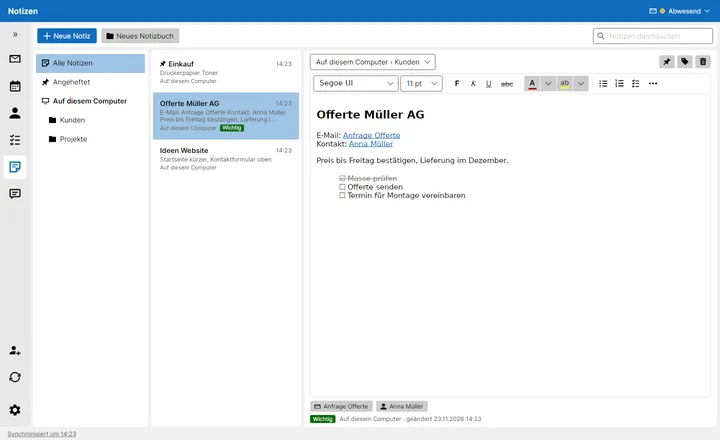
New: Notes
- Write as in an email: the same editor with formatting, links and pictures. The first line is the title. Notes are saved as you type, no button needed.
- Organise: notebooks (nested too), pinning, search and the same tags as for email – you maintain them only once.
- Checklists: one click in the formatting bar, tick items off with a click on the box. Done items are struck through.
- Linked: “Note” on an email creates a note with a link to the email and its sender, likewise on a contact or with a right-click on an event. From the note you open the email, contact or event directly. On the contact you see all notes about them, on an email “2 notes”.
- Where notes live: “On this computer” or in the “Notes” folder of your mailbox, in the common notes format for mail accounts. Then you have them on every device, and with a shared mailbox such as info@ the whole team shares the same notes. Neruna stores nothing of its own for this – the notes are in your mailbox.
- Nothing gets lost: if the same note is changed on two devices at the same time, Neruna keeps both versions and marks one as a conflict copy.
Also
- Settings reorganised: “Program” first (About Neruna, News, View, Profiles and workspaces, AI, Integration), then Accounts, Email, Security, Calendar and Data. “Integration” brings together the default mail program and sending from other programs; “Data” shows backup, search index, local data and folders on one page.
- Delete key: it now deletes an email only in the list or while reading – never while you type in a field.
- Shortcuts for quick actions now also work when the focus is in the displayed email, with digits, Shift or Alt too.
- Less in the logs: setting up an account and S/MIME certificates no longer write addresses or domains to the log.
Notes are new – I’d love to hear what you still miss.
Neruna Desktop fetches the update by itself as always – or get it on the download page.